Documentation
Authoring and configuration
Authoring and configuration
Run doukimd build --config doukimd.yaml or doukimd check. The latter
compiles and validates without writing output. Paths are relative to the
configuration file; directory traversal and paths escaping the project are
rejected.
See the runnable project under examples/basic.
Markdown and metadata
Markdown and .ipynb pages under docs/ become HTML at the same relative
path. Optional YAML
front matter accepts title, render (markdown or jinja), and meta,
plus the page controls described below.
Unknown keys, duplicate keys, invalid types, and malformed YAML are errors.
Enable Jinja with render: jinja. Templates receive site, project,
page, data, api, plugins, and build. Project configuration and
front matter remain literal YAML. Content is rendered once, before Markdown
parsing. Values returned by templates are not evaluated again.
Content includes come from includes/. Use the md_text filter when
inserting a plain string into Markdown. Jinja syntax inside code fences is
still evaluated on templated pages: use Jinja raw blocks for literal examples.
Docstring prose is parsed as Markdown and never evaluated as Jinja.
The dialect includes CommonMark, tables, footnotes, API blocks, and API references. Raw HTML is disabled by default. Python code highlighting uses Pygments; unknown languages fall back to plain text.
Configuration
Required settings are site.title and project.name. Defaults are
schema_version: 1, docs_dir: docs, output_dir: build, and
includes_dir: includes. Data is a mapping of names to YAML mapping files.
project.version is optional. api.generate_pages defaults to true.
An API source has language: python, a project-relative root, and
modules containing import paths. Configured modules and their declared
submodules, classes, and functions are collected statically. Included public
declarations require valid Douki docstrings. Explicit Douki visibility and
atpublic decorators control visibility; underscores do not imply privacy.
Literal __all__ selects exported declarations; package submodules are also
collected. Without __all__, local declarations are included, while imports
are followed only when explicitly exported. Unresolved or cyclic exports fail
the build. Re-exports retain their public names and original declaration
identity and location. Exported aliases must resolve within the selected
source folder; runtime inspection and external dependency imports are disabled.
Properties, enum values, fields, constants, and annotated type aliases have
reference pages. Data declarations can rely on their source annotations and
values without an invented docstring; class field descriptions are reused
from Douki attributes. Handwritten modules, classes, and callables still
require valid Douki documentation. Generated dataclass constructors are
identified as generated and use their statically derived signatures.
Plum dispatch families (including aliases and Base.method.dispatch
registrations) retain every signature and its own docstring. Typing overloads
retain their declared signatures and use implementation prose when a stub has
no docstring. Unknown repeated-definition patterns fail instead of retaining
only the last declaration. Inherited members are not expanded in this version.
Selecting source folders per page
Name sources to isolate packages in a monorepo:
api:
  sources:
    - name: arx
      root: packages/arx/src
    - name: irx
      root: packages/irx/src
When modules is omitted, DoukiMD discovers top-level Python modules and
regular packages in the folder. The folder can also be a package directory
containing __init__.py. Set modules: [irx.table_io] to select a smaller
surface from a source tree. Namespace packages remain unsupported.
Select a default source for a Markdown page:
---
title: IRx reference
api_source: irx
---

::: api irx.table_io
members: public
:::

See {@api irx.table_io}.
An individual API block can override the page choice with source: arx.
Fully qualified references such as {@api python:arx:arx.get_version} can
link across sources. Ambiguous unscoped names and unknown source names fail
the build. Folder paths are configured once; Markdown uses source names.
Two folders may contain identically named Python packages without collisions.
Duplicate source names are errors.
Named sources use identities python:<source>:<qualified-name> and routes
api/python/<source>/<qualified-name>.html. Unnamed sources retain the
original python:<qualified-name> identities and routes. The symbol inventory
includes source_name, original canonical identity, generated, and
callable variants with signatures and declaration lines.
When API names collide on a case-insensitive filesystem (such as a public
Compiler class and a compiler module), their filenames receive stable
identity-derived suffixes. API references and generated summaries use the
planned routes automatically.
API blocks and references
::: api python:example.add
show_source: true
:::
API blocks accept members: none or members: public and boolean
show_source. The latter displays a source location, not a repository link.
{@api python:example.add} links to the canonical generated page.
Unknown symbols and references without a generated destination fail the build.
Generated pages live at api/python/<qualified-name>.html. Duplicate routes
are errors; authored overrides and canonical aliases are not implemented.
API directives inside docstrings are rejected.
When collected symbols exist and api.generate_pages is enabled, the engine
also generates api/index.html (served at /api/). The menu gathers all
references under API Docs, with nested modules, classes, and functions.
The index lists root declarations; each reference page summarizes and links
to its immediate children. Explicitly selected submodules remain visible
even when their parent module is outside the configured collection.
The default menu is automatic; explicit project menus can place or scope API
entries as described below. The bundled theme expands the active API branch and lists section anchors
under On this page. Disabling generated pages removes the API section.
Project navigation
Without navigation settings, every authored page and the generated API hierarchy appear in the sidebar. Explicit menus preserve your configured order:
navigation:
  navbar:
    - title: Home
      path: index.md
    - title: Arx
      path: arx/index.md
    - title: Tools
      children:
        - title: Repository
          url: https://github.com/arxlang/arx
  default_sidebar: project
  sidebars:
    - id: project
      title: ArxLang
      items:
        - title: Home
          path: index.md
        - title: API Docs
          api: "*"
    - id: arx
      title: Arx
      paths: [arx/, api/python/arx/]
      items:
        - title: Overview
          path: arx/index.md
        - title: Language
          children:
            - title: Getting started
              path: arx/getting-started.md
        - title: Python API
          api: arx
path is relative to the documentation root and accepts Markdown or HTML
page names, directory URLs, queries, and heading anchors. The engine checks
these targets and computes links relative to each output page. url accepts
HTTP, HTTPS, or mailto links. A children group needs no target; a page or
external link may also have children.
api: "*" inserts the generated API browser in a sidebar.
api: arx selects only symbols from the source named arx in api.sources;
no filesystem paths or handwritten API routes are needed in the menu. A
single package links to its root page. All selected modules and submodules
appear in one flat accordion list. API generation must be enabled and the
selected source must have generated pages.
A sidebar's paths match output route prefixes ending in /, or exact HTML
routes. The longest matching prefix wins; equally specific matches across
sidebars are errors. Set sidebar: arx in front matter to select a menu
explicitly, or sidebar: false to hide it. Otherwise the configured
default_sidebar applies. With explicit sidebars and no default, unmatched
pages have no sidebar. All configured menu targets are checked, including
menus that are currently hidden. Index links for a product directory mark
that product's navbar branch active on its descendants.
Header API entries link to the API index or a single selected package. When a named source has multiple roots, the header offers only those root links; the module accordion stays in the sidebar. Header dropdowns remain closed until opened by the reader.
The API sidebar keeps the same ordered list of module accordions on every
page. Only one module opens at a time. Each contains a Module overview
link and flat declaration links with kind labels; classes never open nested
menus. Their methods, attributes, and nested classes are linked from the
documentation content. Member pages highlight their containing class in
the sidebar with aria-current="location".
The current page's closest module opens automatically; otherwise the first
module starts open. Submodules appear at the same level with dotted names.
When a menu includes multiple roots, names include their package and source
to stay distinct. Named-source menus keep their selected modules even on
pages from another source. Native details grouping works without
JavaScript in supporting browsers; the theme adds an exclusivity fallback
for older browsers. All module links remain usable without JavaScript.
Configured nested page menus use full-width accordion headings without tree lines or increasing indentation. Select a heading to expand or collapse its children; an Overview link inside opens the group's own page, when it has one. Groups containing the current page expand automatically, and other groups start closed. Readers can keep several groups open. Both menu styles work without JavaScript or Bootstrap.
Page layouts and branding
Front matter supports layout: docs (the default), full (unrestricted site
width), or landing (full width without the sidebar, title banner, or TOC).
Use boolean toc, show_title, and sidebar to control the standard layout.
A page's first Markdown heading remains authored content; show_title: false
hides only the theme banner.
site:
  title: ArxLang
  description: Compiler ecosystem documentation
  logo: images/arx-logo.png
  logo_alt: ArxLang
  favicon: favicon.ico
assets: [assets/**, images/**, favicon.ico, styles.css]
theme:
  stylesheets: [styles.css]
Assets and stylesheet paths are relative to docs_dir. Patterns select files
or directories recursively; nondefault patterns that match nothing are errors.
Markdown and notebooks are document inputs and cannot be copied as assets.
Asset paths cannot escape the documentation directory, and output collisions
with pages, theme files, metadata, or differently cased filenames fail before
publication. Logos, favicons, and extra stylesheets must be copied assets;
the engine computes their URLs for nested pages. CSS is copied unchanged;
use URLs relative to its output location. SCSS compilation is not included.
An explicit assets list replaces the default, so keep assets/** when needed.
For custom homepage markup, opt in with html: true in front matter. Combine
it with render: jinja to use metadata in HTML or Markdown. This is trusted
authored HTML, without sanitization; enable it only for content you control.
Douki docstrings keep HTML escaped independently of the page setting.
CommonMark requires blank lines around HTML wrappers to parse Markdown inside.
HTML id anchors participate in link validation; duplicate ids fail. Local
HTML href, src, and poster attributes are checked and Markdown page
links rewritten, just like ordinary Markdown links. CSS URLs, srcset,
inline scripts, and custom-template links are outside this validation.
A page can choose template: home.html from theme.directory. To customize
part of the bundled layout, that template can extend page.html and override
Jinja blocks head, header, page_heading, page_content, or footer.
For example, {% extends "page.html" %} followed by
{% block footer %}<footer>ArxLang</footer>{% endblock %} changes the footer.
Missing templates or template paths escaping their configured root fail.
Links and output
Relative Markdown links are rewritten to HTML and checked after all pages
and heading anchors are known. Duplicate heading anchors get stable numeric
suffixes. Local images and downloads must match the configured assets
patterns (by default docs/assets/**).
External and site-root links are not fetched or checked.
Output includes HTML, CSS, the local search script and index, symbols.json,
and a versioned build manifest. No generated Markdown is written into source.
DoukiMD replaces an existing output directory only when its manifest identifies it as a managed build. A failed compilation preserves the previous output. The output directory must not overlap documentation, source, includes, theme, or configured data inputs.
Notebooks
Version 4 Jupyter notebooks are discovered alongside Markdown. A notebook
tutorials/lesson.ipynb produces tutorials/lesson.html; links and menus can
use the .ipynb name, including queries and heading anchors. Notebook and
Markdown files share one route namespace, so matching stems are errors.
Builds validate the original document against nbformat's shipped schema and render existing cells and outputs. They never start a kernel, import notebook code, install its dependencies, execute cells, or change notebook files. Run notebooks in Jupyter separately to refresh their saved results.
The first cell, when Markdown, can contain the same YAML front matter as a
.md page. Alternatively, put page settings in notebook JSON metadata under
metadata.doukimd; first-cell front matter overrides explicitly supplied
fields. All page controls, API source selection, and search exclusion apply.
With render: jinja, only Markdown cell sources are templated. Code, raw
cells, attachments, and saved outputs remain literal.
Markdown cells support the normal API blocks, references, local links,
headings, and TOC. Reference definitions and footnotes are scoped to their
cell; footnotes receive unique page-wide ids. Code is highlighted using
language_info.name or kernelspec.language. Raw cells render as escaped
text. Standard cell tags remove-cell, remove-input, and remove-output
omit the selected content from both HTML and search; the latter two apply
to code cells.
Saved stdout, stderr, and tracebacks render as escaped text without ANSI control codes. MIME bundles choose one representation in this order: HTML, SVG, PNG, JPEG, GIF, WebP, Markdown, JSON, then plain text. Markdown outputs use plain CommonMark and tables without Jinja or API directives. Unsupported formats need a supported fallback; otherwise the build fails with a cell location. A widget with a plain-text fallback displays that fallback.
PNG and other raster outputs are validated as base64. Images and Markdown image attachments are embedded as data URLs, with SVG kept in image context. HTML outputs use sandboxed frames with scripts, forms, parent access, and external resource loading disabled. Inline styles and embedded data images are allowed; frames can be resized vertically. Interactive widgets and JavaScript outputs are not executed. Rich-output links are separate from document reference validation.
Try doukimd build --config examples/notebooks/doukimd.yaml for a complete
example with saved output.
Local search
Search is enabled by default and runs in the reader's browser, using only the
bundled search.js and lazily fetched search.json. It indexes guide prose,
code, generated API documentation, and visible notebook content, with links
to Markdown heading anchors. API result titles include qualified identities.
Each query requires all its words; title matches rank above body matches,
and results keep the best matching section per page.
search:
  enabled: true
  limit: 8
  min_length: 2
limit accepts 1–50 results; min_length accepts 1–10 characters. Set
search: false in page front matter or notebook page metadata to omit that
page from the index. This affects search, not whether the page is published.
Disabling the site search omits its controls, script, and index.
Open search with the header button, /, or Ctrl/Cmd+K when outside editable
controls. Arrow keys move between results, Tab follows native dialog focus,
and Escape closes the dialog and restores focus. Queries support Unicode
normalization and case-insensitive matching. Failed index loads show a retry
message. Result text is inserted as text, never interpreted as HTML.
Serve the generated site over HTTP, including under a repository subpath.
For local use: python -m http.server --directory build. Browsers generally
block fetching the search index when opening HTML through file://.
Search requires JavaScript and native dialog support; other navigation works
without either. Custom themes receive search, search_script, and
search_index_url to integrate their own controls. The index is a JSON array
of {title, url, text} records, with site-root-relative page and section URLs.
Themes and plugins
The bundled theme uses Bootstrap by default. Configure presentation under
theme:
theme:
  framework: bootstrap
  color_mode: auto
  palette: terracotta
framework accepts bootstrap or none; the latter omits Bootstrap for
custom themes. Bootstrap 5.3.8 CSS and its license are bundled locally.
Builds and readers do not need a CDN, npm, or Bootstrap JavaScript.
The built-in layout and appearance controls also work with none.
color_mode accepts auto (the system preference), light, or dark.
Readers can change Appearance in the header; their choice overrides the
configured default and is saved per project when browser storage is available.
System mode follows subsequent OS preference changes. Without JavaScript,
the configured light/dark mode is used; auto falls back to light.
Navigation stays usable without JavaScript, including on mobile.
palette accepts five presets: terracotta (the default), ocean, forest,
violet, and slate. Each has light and dark colors and works with either
framework setting. Readers can change Palette in the header independently
of Appearance; both choices persist per project when storage is available.
Invalid saved values fall back to configuration. Without JavaScript, the
configured palette still applies.
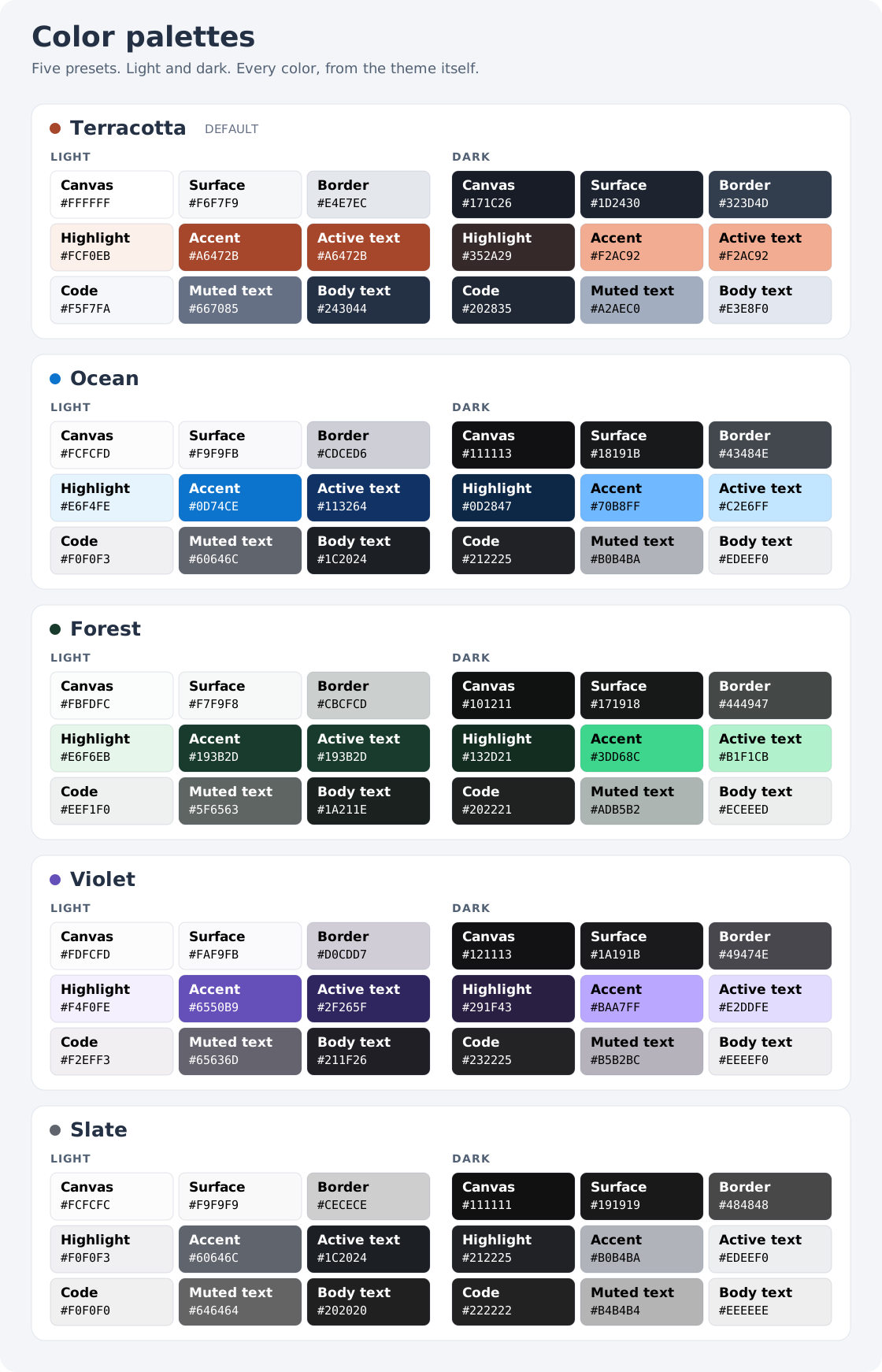
Select the chart to open it at full size. It shows all nine theme color roles in both modes, using the exact preset values.
Terracotta keeps DoukiMD's original colors. The other four presets use Radix Colors 3.0.0 scales under the MIT license, bundled with their attribution. They require no Radix components, npm package, or network access. Body text, muted text, links, and active navigation colors are checked at 4.5:1 or better against their backgrounds. API-kind colors stay consistent across palettes.
API labels identify modules, classes, functions, and methods in navigation and declaration headings. Method kinds are collected from class parentage, including static and class methods. Labels use text as well as color.
Set theme.directory to a local directory containing page.html to override
the bundled HTML template. Themes receive the content context plus
content, navigation (the selected sidebar), navbar, sidebar_title,
table_of_contents, and stylesheet.
Navigation entries expose title, relative url, kind (null for authored
pages), current (exact route),
active (current route or descendant), and recursive children. Group-only
entries have a null url; render their labels without an anchor.
Table-of-contents entries expose title, anchor url, and level (h2 or
h3). Both structures are planned by the engine and can be styled by themes.
HTML autoescaping is enabled;
only the engine-rendered content should use Jinja's safe filter.
Templates also receive theme settings, palettes (supported preset names),
home_url, theme_script, logo_url, favicon_url, extra_stylesheets, and
framework_stylesheet (null for none). Load the optional framework CSS
before stylesheet. The page object includes its API identifier and
kind, both null for authored pages, as well as all front matter settings. Symbol kinds are also in symbols.json.
Explicitly enabled plugins are loaded from the doukimd.plugins Python
entry-point group. Each entry point exposes an object with a
@doukimd.plugins.hookimpl method named doukimd_context(config) returning
a JSON-compatible mapping. Its values appear under plugins.<plugin-name>.
Configuration order defines invocation order. Missing plugins, unsupported
hooks, and invalid results fail the build. Plugins run trusted Python code.
Initial boundaries
Arx collection, inherited members, dynamic Python APIs, automatic repository source links, incremental builds, a preview server, and cross-project inventories are follow-up work. Arx configuration is rejected until an adapter can consume retained frontend docstrings.